For those of you that have never attempted to use PhotoPost:
Got to
PhotoPost and click Upload Photos, which is in the upper right of the screen.
You will then see this window:
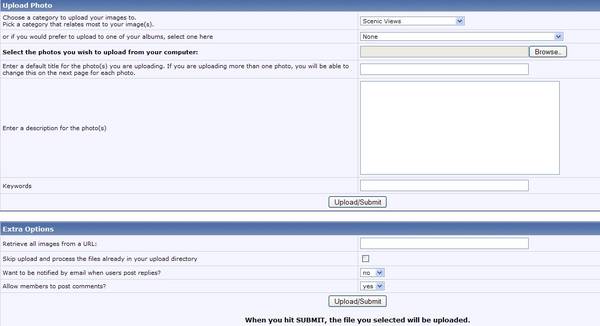
Choose the category in which you want your photo to show up.
Click the Browse button and select your picture from your computer.
Enter a title and fill in the description. (The Webmaster prefers good descriptions for easier searching/viewing.)
You can fill in key words if you would like to.
If you want to be notified by e-mail when a user posts a reply, click yes. (This can be turned on later if you forget here)
Then click Upload/Submit, which can take a minute or two and will bring up your uploaded photo.
(You may have to wait for approval from the Webmaster for your picture to appear in the Gallery.)
____________________________________
____________________________________
Good luck! I hope my lessons are easy enough to follow.
I hope that this post will give someone the courage insert a picture or to use our wonderful
PhotoPost Gallery. I love pictures!

Winnipesaukee.com is fun!